Nowadays, GPS has become an essential tool in our lives, helping to locate and navigate to various destinations. However, we don't always have a stable and continuous Internet connection, especially when traveling to more remote areas.
Given this scenario, GPS applications that work offline appear as an excellent alternative. These applications allow users to download maps and routes while connected to the Internet and later use them without the need for a data connection.
The Importance of Offline GPS Apps
It is at this juncture that the importance of GPS applications that can operate offline stands out. They are not only useful, but indispensable for those who are in regions with irregular or non-existent network coverage, thus ensuring that they can reach their desired destination without any major problems.
1. Google Maps
Google Maps is, without a doubt, one of the most popular map apps in the world. In addition to its online functionalities, the app allows users to download maps for offline use. This means you can navigate and receive driving directions even when you are offline.
Additionally, Google Maps regularly updates its offline maps, ensuring you always have the latest information, even when you're not connected. Real-time traffic updates will not be available, but basic directions remain intact.
2. HERE WeGo
HERE WeGo is a highly efficient mapping and navigation application that allows full use of maps without the need for an Internet connection. It is a very complete application, with directions for drivers, pedestrians and public transport users.
Unlike other apps, HERE WeGo allows you to download maps of entire countries, which is extremely useful for international travel. It also provides detailed information about traffic and different routes.
3. Maps.me
Maps.me is known for its simple and easy-to-use user interface. Maps can be downloaded by country or region, and once downloaded, they offer complete and free navigation, without the need for an Internet connection.
Additionally, Maps.me has a wide range of points of interest, ranging from restaurants and hotels to tourist attractions and hospitals, making it a very practical and useful travel guide.
4. OsmAnd
OsmAnd uses data from OpenStreetMap, which allows users to download a variety of maps for offline use. In addition to providing point-to-point GPS navigation, it also offers other functionalities such as viewing topographic maps and traffic information.
Furthermore, OsmAnd allows for deep customization of the map, allowing users to highlight the types of information they find most useful, such as trails, secondary roads and points of interest.
5. Sygic
Sygic is one of the most advanced and in-depth offline navigation apps available. It offers high-quality offline maps that are updated regularly. Additionally, it has a wide range of features, including lane guidance and speed limit information.
Sygic also stands out for its augmented reality functions, which use the smartphone's camera to project navigation onto the real image of what is in front of the driver, making the driving experience even safer and more intuitive.
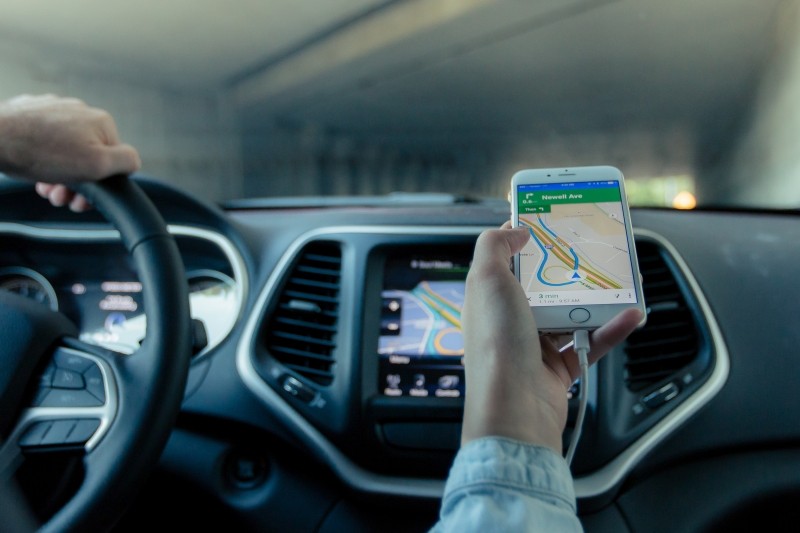
How GPS works without internet.
This is the part that almost no one explains, and it's what resolves all the confusion: The satellite provides your location; the internet only delivers a map image.. These are two separate services that reach the mobile phone through different paths.
Inside the device is a receiver that listens for radio signals from navigation satellites. Each satellite continuously transmits its identification and the exact time the message was sent. Because the signal travels at a known speed, the cell phone calculates the distance to each satellite based on the time it took for the message to arrive. With three of these distances, it determines your location on the plane; with four or more, it adds the altitude and adjusts its own clock.
Two details matter:
- The receiver only listens. It doesn't transmit anything, it doesn't notify anyone, and it doesn't need an operator. That's why the service is free worldwide and continues to function in the middle of the desert.
- There is no single system. In addition to American GPS, modern cell phones also receive Russian Glonass, European Galileo, and Chinese BeiDou. The more constellations the device sees, the faster and more accurate the calculation becomes—and you don't need to configure anything for that.
So what does the internet do? It retrieves the image squares that make up the map from the server, checks the current traffic, searches for business names, and recalculates routes on the server. If you downloaded the region beforehand, the map is already on your device—and the whole thing works without a single bar of signal.
Why does it sometimes take so long to "get" the location?
Anyone who's ever watched the little blue ball spinning at the entrance to the road knows the scene. The technical term is time to first position, and it varies greatly depending on what the phone already knows.
To calculate its location, the receiver needs a table with the predicted orbits of the satellites. This table is included in the satellite signal itself, but slowly: capturing everything from the air can take from several seconds to a few minutes, and any interruption forces the receiver to restart the segment. That's where the feature known as assisted GPS comes in: with internet access, the cell phone... Download this table over the network in the blink of an eye. And the first positioning happens almost instantly.
In other words: internet access isn't necessary for GPS, but it greatly speeds up the initial setup. On a trip without a signal, the first freeze takes longer to occur—and that's not a defect in the device.
What helps in practice:
- Open the app while still on your home Wi-Fi., Before leaving, the phone saves the table for a few hours and reuses it later.
- Point the device towards the sky. He can see well from the windshield mount; inside the glove compartment or his pocket, he can barely see anything.
- Wait still. One or two minutes with the car parked in the open air solves what ten kilometers of road with the lost device cannot.
- Be careful with metallized film and certain types of window tint., In addition to metal supports surrounding the device, these interfere with reception.
What works offline and what requires an internet connection?
Downloading the map doesn't turn the app into a clone of the connected mode. It's important to know what remains available:
- It works without internet: Show your location, calculate routes within the downloaded area, give turn-by-turn voice instructions, recalculate when you miss a turn, display points of interest that came with the map, and show the speed limit that is registered.
- It doesn't work without internet: Real-time traffic information, estimated time of arrival adjusted for congestion, reports from other drivers, search for establishment names not included in the downloaded package, street view, public transport schedules, and routes that pass through areas not included in the download.
This last item is what ruins the trip the most: the person downloads the destination city, forgets the middle leg of the trip, and the app refuses to plot the route. Download the... entire corridor, Not just the tips.
Airplane mode with GPS enabled: why it works
Here's a trick that directly relies on the mechanics explained above. Since the satellite receiver only listens, it continues to function with the phone in airplane mode — just keep the system's location services enabled. And since the map is already saved on the device, navigation continues normally.
The benefit is battery life, and it's significant precisely where there's no signal. In an area without coverage, the cell phone becomes... Searching for network at maximum power., Repeatedly, this search consumes much more power than the satellite receiver can handle. Cutting the network signal on a stretch of mountain road or empty highway usually provides considerable autonomy.
What you lose while in airplane mode: calls, messages, traffic, and any new searches. You can turn on the network from time to time, check what you need, and switch back to airplane mode. If you're expecting an important call, forget the trick—security comes before savings.
Common mistakes made by those who rely on offline maps.
- Download only the destination. The app needs the entire region the route passes through, including the intermediate segment.
- Let the map age. Downloaded map packages have an expiration date and need to be renewed from time to time. An expired map may simply stop calculating routes.
- Forgetting that battery optimization kills the app. On many devices, you need to disable the browser from this power saving feature, or it will be suspended in the background mid-way through.
- Rely on the street map for the trail. Dirt roads, trails, and paths are often not registered, or their information is outdated. For wooded areas, the right app is a topographic map, and even then, bring a paper map.
- Thinking you lost your GPS because you lost signal. These are different things. Without a signal, you lose the new map and the traffic information; the location still comes from the satellites.
- Installing navigation apps from outside of official app stores. It's a program with permanent access to your location. That's the last place on your phone where it's worth skimping on trust.
Questions about GPS without internet
Does GPS use mobile data?
The positioning itself doesn't cost anything — it comes from the satellite. What consumes data is the map loading new segments, traffic, and advertisements. With the region downloaded, the cost drops to almost zero.
Do I need a SIM card in my phone to use GPS?
No. A device without a SIM card, with the map downloaded, functions like a regular web browser. Without a SIM card you lose calls and internet access, but not your location.
Why does the little blue ball keep bouncing around in the big city?
Because the signal hits the buildings before reaching the device, and the extra distance traveled confuses the calculation. Tunnels, overpasses, garages, and dense forests cause the same effect.
How precise can we expect?
In open air, just a few meters is enough to know which street you're on. In a corridor between tall buildings, the error increases considerably, which is why the app sometimes thinks you're on the parallel street.
Is a dedicated GPS device worth it?
For most people, no: cell phones use the same constellations and receive map updates much more frequently. A dedicated device still makes sense for specific uses, such as boating and long hikes, where battery life and durability are more important than a pretty screen.
Read also
- Driving Theory Test via Cell Phone: What the Apps Do and What They Don't
- Free Offline GPS: How to Download the Map and Navigate without Data
- Speed Camera Alerts on Cell Phones: What the Law Allows and What it Prohibits
- View Your City by Satellite: The Apps and Why the Image Isn't Live
- Free Radar Alert: How the Alert Works and Where It Fails
Conclusion
In short, GPS apps that allow offline use are true saviors for travelers and those residing in areas with spotty Internet connections. They ensure that regardless of your connectivity situation, you can reach your destination safely and efficiently. Therefore, with the diversity of options available, it is possible to find the application that best meets your needs, ensuring a smooth and well-guided journey.