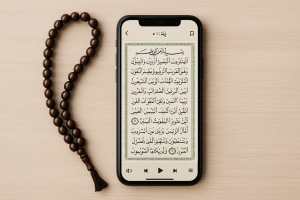
📌 Quick Guide
- 📖 Download a reliable Quran reading app on your phone.
- 🌙 Check if the app offers translation, audio, and offline mode.
- 🕌 Activate daily reminders to maintain consistency in reading.
- 🎧 Prefer apps with integrated recitation of different Qaris and tafsir.
- 🤲 Keep the app updated for added security.
Reading the Holy Quran Praise is a central practice in the lives of millions of people around the world. Traditionally, many use printed versions for study and recitation, but technology has brought about a silent revolution: now it's possible to access the Quran directly from your cell phone, anywhere and anytime. This resource has been an ally for Muslims who wish to maintain a constant connection with their faith, even amidst a fast-paced routine. In this guide, we present a complete analysis of the best apps for reading the Quran. Quran on mobile, Its advantages, features, and practical tips for making the most of this spiritual experience.
✨ Advantages of Reading the Quran on Your Cell Phone
🌍 Global Access
With just a few taps, you can read or listen to the Quran anywhere in the world, without relying on a physical copy.
📚 Teaching Resources
Many apps provide tafsir, translations, and commentary that make it easier to understand, especially for beginners.
💸 Economy and Practicality
Most apps are free, eliminating the need to purchase different editions or additional materials.
👁️ Reading Comfort
Font, color, and night mode adjustment options make reading more enjoyable in any environment.
🎙️ Interactive Learning
Audio recitations help with memorization and correct pronunciation, making them an important advantage for those studying Tajweed.
⏳ Consistency in Practice
Reading reminders and bookmarks encourage continued daily study.
📶 Offline Mode
Even without an internet connection, you can access previously downloaded chapters, ensuring reading in any situation.
📲 Best Apps to Read the Quran
1. Quran Majeed
Availability: Android and iOS
Quran Majeed is one of the most complete apps for Reading the Quran. It offers Arabic text with translations in several languages, as well as recitations by renowned Qaris. The app allows verse highlighting, has an offline mode, and Tajweed features that emphasize correct pronunciation. Its modern interface and constant updates make it a safe choice.
2. iQuran
Availability: Android and iOS
iQuran is known for its clean and easy-to-use interface. In addition to Arabic text, it offers tafsir and reliable translations, allowing for a more in-depth study experience. It's ideal for those seeking convenience without sacrificing important details. The premium version offers even more features, but the free version is already quite adequate.
3. Muslim Pro
Availability: Android, iOS and Web
More than a reading app, Muslim Pro is a comprehensive tool for Muslims' daily lives. It includes prayer times, a Qibla compass, and personalized reminders. Its digital Quran is interactive, with synchronized audio and recitations from different Qaris. It also has a global community that shares content and experiences.
4. Quran for Android
Availability: Android
Simple and to the point, this app was developed with an exclusive focus on the Quran. Lightweight and fast, it offers translations in dozens of languages, supports audio recitations, and bookmarks. It's perfect for those who want just the essentials, without extra distractions.
5. Quran Explorer
Availability: Android, iOS and Web
Quran Explorer is excellent for those who want to deepen their studies. It synchronizes reading progress across devices and offers detailed tafsir. It also allows you to listen to recitations while following the text, making learning even more dynamic.
6. AlQuran (Tafsir & Recitation)
Availability: Android and iOS
This app combines the complete Quran with tafsir from renowned scholars. In addition to translations, it offers different study modes, recitations, and the ability to share verses directly on social media. It's an interesting option for those seeking in-depth learning.
7. Quran Hive
Availability: Web and Mobile
Designed for a modern experience, Quran Hive offers an intuitive interface and features such as tafsir, translations, and audio. It's quite popular among young people who want convenience without sacrificing reliability.
🌟 Cool Extra Features
- 🎧 Audio with translation: Some apps allow you to listen to the recitation along with the translation in real time.
- 📅 Home screen widgets: quick access to verses and daily reminders without opening the app.
- 📲 Instant sharing: send excerpts to friends and family directly via WhatsApp or social media.
- 📊 Reading statistics: track your daily progress and goals achieved.
⚠️ Common Care and Mistakes
- ❌ Avoid apps without reviews or from unknown sources.
- 📖 It does not completely replace the printed version – the mobile version is a complement.
- 🔎 Check the reliability of translations before in-depth study.
- 🔄 Don't ignore updates – many bring security improvements.
- 🤲 Maintain respect while reading, even on mobile devices.
🔄 Interesting Alternatives
- 📑 PDF versions: ideal for reading in digital book apps.
- 💻 Online reading sites: useful for those who prefer to access via computer.
- 📚 Physical books: essential to maintain tradition alongside the digital version.
❓ Frequently Asked Questions (FAQ)
Not necessarily. Most allow you to download chapters and recitations for offline reading and listening.
Yes, but some offer paid plans with additional features like advanced tafsir and more recitation options.
Yes, it is an accepted and widely used way of keeping in touch with the Quran in everyday life.
Quran Majeed and Muslim Pro are recommended for their user-friendly interface and comprehensive features.
Yes, most apps offer a wide variety of renowned reciters with different styles.
📌 Conclusion
Reading the Quran on your phone is a unique opportunity to maintain spiritual connection anywhere, anytime. With the right apps, you can study, listen to recitations, share teachings, and strengthen your faith in a practical and modern way. We recommend trying the apps listed in this guide, choosing the one that best suits your routine, and maintaining a daily reading habit. Share this article with friends and family so more people can benefit from this accessible way to connect with the Quran.
👉 Final tip: Save this content, test the apps, and check back often for future updates and new features.
🔤 Recitation, translation, and transliteration: three different things
The three appear side-by-side on the same screen, many people use all three at the same time, and almost no one explains what each one is. The confusion between them is the source of many of the questions that beginners have.
- Recitation It's an audio recording: someone reading the text in Arabic, with the pronunciation rules and pauses specific to that reading style. It's useful for listening, following along with your eyes, and training your ear before attempting to read it on your own.
- Translation It's the meaning conveyed into another language. There's always a translator behind it, with their own vocabulary choices—that's why two translations of the same passage can sound quite different without either being wrong. It's what allows for understanding; it's not the text itself.
- Transliteration It is the sound of Arabic written with Latin letters, such as "bismillah". It serves as a crutch for those who do not yet read the Arabic alphabet and want to follow the recitation aloud. It is the most limited of the three, because several Arabic sounds do not have an equivalent letter in Portuguese, and the approximation always loses something.
The combined use that usually works best: Audio to listen to, Arabic text to follow along, and translation to understand.. Transliteration serves as a temporary aid, and it's worth treating it as such—as a stepping stone, not a destination. Those who truly intend to read end up saving time by learning the alphabet, even if slowly.
🎨 What do the colors of tajweed mean?
That text with letters in red, green, and blue is neither decoration nor a highlight of importance. The colors make a statement. pronunciation rulesThis refers to where a letter is prolonged, where it merges with the next, where nasalization occurs, and where the reading stops or continues. It's a system of visual reminders created for printed text and reproduced by applications.
Three practical observations:
- The caption matters. Not every edition uses the same color code. Look in the app for an explanation of each color—it's usually found in the display settings or in a help button near the text—and check if it's the same one you're used to.
- Color reminds, it doesn't correct. She indicates that there is a rule there; applying the rule remains the task of the reader. The app doesn't listen to you.
- Too much color is a hindrance at first. If you are learning to recognize letters, colored text can be more of a hindrance than a help. Several apps allow you to turn off the colored tajweed and turn it back on later, when your reading is more fluent.
And the same caveat applies as always: visual aids speed up learning, but pronunciation correction is the responsibility of the teacher. No app can replace someone listening to you read.
📚 Tafsir: what the app really delivers
Tafsir is a text commentary—an explanation of context, vocabulary, and meaning, written by an identified scholar. This changes everything when choosing an app, because simply saying "has tafsir" doesn't really mean anything. What it does mean is... which tafsir.
What to check:
- Whose work is it?. The app should name the author of the comment it is displaying. There are many, from different eras and with different approaches.
- Whether it's complete or summarized. Many apps offer abbreviated versions due to size constraints. This is fine, as long as it's clearly visible.
- In what language was it written?. If the commentary is a translation of a work in Arabic, you are reading an additional layer of interpretation—that of the translator on top of that of the commentator.
- How much does it occupy?. The tafsir package is a long text file and is usually one of the largest downloads in the application, after the audio file.
- If it's possible to have more than one. Being able to compare two comments on the same passage is the most useful tool for serious students.
For beginners, a short and direct comment yields more than a lengthy work opened occasionally. And, for any questions that go beyond the text—regarding practice, application, or differing interpretations—the reference remains the guidance of qualified people in your community.
👓 Comfortable reading on a small screen
Reading dense text on a cell phone is more tiring than reading on paper, and most of this can be fixed in the settings. The adjustments that help the most are:
- Choose between page and verse. Page view mode replicates the format of the printed edition and is preferred by those who memorize by the passage's position on the page. Verse view mode stacks verses one below the other, with the translation alongside, and works much better on a small screen.
- Increase the font size of the Arabic text separately. Many apps have two size controls — one for the original text and another for the translation. Make the Arabic larger; the vocalization marks are small and disappear in a smaller font.
- Use dark mode at night. and reduce the screen's color temperature. A light background in a dark room is what tires the eyes the most.
- Turn on the option to keep the screen on. during reading. Without it, the screen goes black mid-sentence and the device asks for the password again.
- Try the lying-down orientation. In page view mode, turning the phone around usually makes it much closer to the format of a book.
- Activate the system's focus mode. Incoming notifications are the biggest enemy of continuous reading, and both Android and iPhone allow you to silence everything for a period of time.
❓ More questions about reading on your phone?
How do I continue where I left off if I switch devices?
Only through synchronization, which usually requires creating an account in the app. Without an account, the bookmark is saved only on that phone and can be lost if the phone is switched or formatted.
Is it possible to read it offline from day one?
The text usually comes with the installation or is downloaded on the first launch, and after that it works offline. Translation, tafsir, and audio are almost always separate packages that need to be downloaded separately.
Why do the letters appear broken or out of order?
It's a font issue: the device doesn't have the font type the app requires, or the system version is outdated. Downloading the font offered by the app itself, when the option is available, usually solves the problem.
Is there a keyword search function?
In most apps, yes — and it works with both Arabic text and loaded translations. It's the most time-saving feature for studying, and the one most lacking in very simple apps.
Can I write down my reflections within the app?
Many allow for verse-by-verse note-taking, as well as bookmarks and favorites lists. If this feature is important to you, check beforehand if it's available. export the notes — so as not to lose years of study if the app goes offline.
Does reading on your phone replace the printed edition?
These are different uses that complement each other: the cell phone wins in portability, search capabilities, and audio; the printed version wins in comfort for long reading sessions and in not having any notifications. Many people use both, each at its appropriate time.